


SD Torque-Angle control Digital Screwdriver
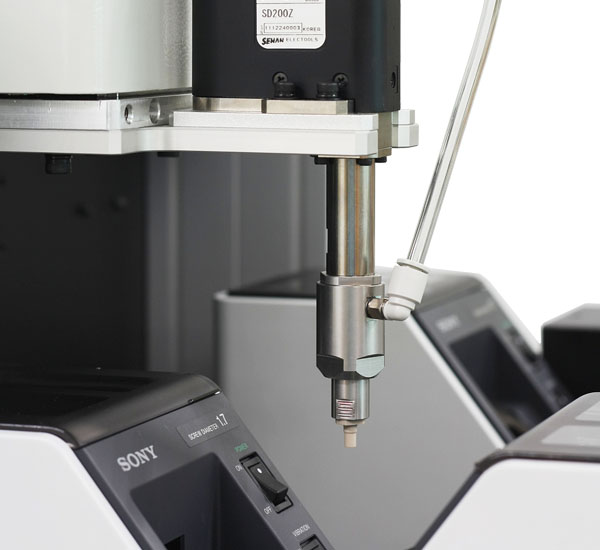
[vc_row][vc_column][vc_custom_heading text=”Series Features” font_container=”tag:h3|text_align:left” use_theme_fonts=”yes”][vc_column_text]
- Profile of fastening process
- Counter setting
- Multi sequence setting (SDC setting)
- Driver ++ setting
- Real time monitoring data
- Real time monitoring CURVE (Speed vs Torque or Anglue vs Torque)
- Screw counter-single
[/vc_column_text][vc_custom_heading text=”Screwdriver” font_container=”tag:h3|text_align:left” use_theme_fonts=”yes”][vc_single_image image=”3234″ img_size=”full”][vc_custom_heading text=”Specification” font_container=”tag:h4|text_align:left” use_theme_fonts=”yes”][vc_tta_tabs][vc_tta_section title=”Lever Start Type” tab_id=”1604300098936-01083cb6-e1b8″][vc_column_text]
| Model | Torque (kgf.cm) |
Speed (rpm) |
Bit Type | Weight (kg) |
Rated Voltage |
Controller |
|---|---|---|---|---|---|---|
| SD070 | 0.1 ~ 0.7 | 340 ~ 930 | E (only D-cut) | 0.26 | DC 24V | SDC-24 |
| SD120 | 0.3 ~ 1.5 | 240 ~ 1,000 | E (only D-cut) | 0.26 | ||
| SD200 | 0.5 ~ 2.0 | 420 ~ 1,000 | A, E (only D-cut) | 0.29 | ||
| SD300 | 1.0 ~ 3.0 | 360 ~ 890 | A, E (only D-cut) | 0.29 | ||
| SD600 | 1.5 ~ 6.0 | 190 ~ 710 | A, E (only D-cut) | 0.33 | ||
| SD1000 | 2.0 ~ 10.0 | 130 ~ 430 | A, E (only D-cut) | 0.38 | ||
| SD1500 | 3.0 ~ 15.0 | 120 ~ 400 | A | 0.38 | ||
| SD05N | 1.0 ~ 5.0 | 400 ~ 1,000 | A, E (only D-cut) | 0.64 | DC 40V | SDC-40 |
| SD09N | 1.5 ~ 9.0 | 300 ~ 1,000 | A, E (only D-cut) | 0.65 | ||
| SD18N | 4.0 ~ 18 | 300 ~ 900 | A | 0.75 | ||
| SD28N | 5.0 ~ 28 | 190 ~ 780 | A | 0.75 |
[/vc_column_text][/vc_tta_section][vc_tta_section title=”Automation Type” tab_id=”1604300052269-26fb26ae-8f4f”][vc_column_text]
| Model | Torque (kgf.cm) |
Speed (rpm) |
Bit Type | Weight (kg) |
Rated Voltage |
Controller |
|---|---|---|---|---|---|---|
| SDA120 [Straight] | 0.3 ~ 1.5 | 400 ~ 1,000 | E (only D-cut) | 0.46 | DC 24V | SDC-24 |
| SDA200 [Straight] | 0.5 ~ 2.0 | 420 ~ 1,000 | E (only D-cut) | 0.46 | ||
| SDA300 [Straight] | 1.0 ~ 3.0 | 360 ~ 890 | E (only D-cut) | 0.46 | ||
| SDA600 [Straight] | 1.5 ~ 6.0 | 190 ~ 710 | A | 0.46 | ||
| SDA1000 [Straight] | 2.0 ~ 10.0 | 130 ~ 430 | A | 0.67 | ||
| SD120Z [Offset] | 0.3 ~ 1.5 | 400 ~ 1,000 | E (only D-cut) | 0.46 | ||
| SD200Z [Offset] | 0.5 ~ 2.0 | 420 ~ 1,000 | E (only D-cut) | 0.46 | ||
| SD300Z [Offset] | 1.0 ~ 3.0 | 360 ~ 890 | E (only D-cut) | 0.46 | ||
| SDA05N | 1.0 ~ 5.0 | 400 ~ 1,000 | A / E (only D-cut) | 0.68 | DC 24V | SDC-40 |
| SDA09N | 1.5 ~ 9.0 | 300 ~ 1,000 | A / E (only D-cut) | 0.69 | ||
| SDA18N | 4.0 ~ 18 | 300 ~ 900 | 0.75 | A | ||
| SDA28N | 5.0 ~ 28 | 190 ~ 780 | 0.75 | A |
[/vc_column_text][/vc_tta_section][/vc_tta_tabs][vc_custom_heading text=”Bit Socket” font_container=”tag:h4|text_align:left” use_theme_fonts=”yes”][vc_single_image image=”3235″ img_size=”full”][vc_custom_heading text=”Dimension” font_container=”tag:h4|text_align:left” use_theme_fonts=”yes”][vc_single_image image=”3236″ img_size=”full”][vc_custom_heading text=”Controller” font_container=”tag:h3|text_align:left” use_theme_fonts=”yes”][vc_custom_heading text=”Specification” font_container=”tag:h4|text_align:left” use_theme_fonts=”yes”][vc_column_text]
| No | Item | Spec | |||
|---|---|---|---|---|---|
| 1 | Model | SDC-24 | 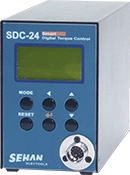 |
SDC-40 | 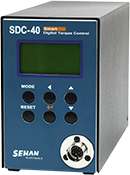 |
| 2 | Input | AC 120V or AC 230V, 50/60Hz, 2.0A | AC 120V or AC 230V, 50/60Hz, 3.0A | ||
| 3 | Output | DC24V, max5.0A | DC40V, max5.0A | ||
| 4 | Fuse | AC250V, 6.3A | AC250V, 10A | ||
| 5 | Dimension / Weight | refer to the drawing | |||
| 6 | Preset Parameters | Torque, Speed & Angle in 8 preset numbers | |||
| 7 | Select the preset no. | 1) Front panel button 2) 25P I/O interface 3) 8 direct sensor connecting port |
|||
| 8 | Torque Calibration | From -10% to +10% | |||
| 9 | Auto detection of the connected driver |
Auto detection of the offset value from the EEP-rom on the driver | |||
| 10 | Error Display | Error display by code no. in system, communication & pattern error group | |||
| 11 | Fastening qulity control | OK/NG monitoing of screw fastening by preset pattern of angles, times | |||
| 12 | Screw Counter | Saving the total screw number and monitoring the number of OK fastening screws. | |||
| 13 | Monitoring and Parameter | Monitoring and parameter setting on the PC program(Ms Windows base) Smart-manager or front pannel |
|||
| 14 | Communication port | USB or RS232C | |||
[/vc_column_text][vc_custom_heading text=”Dimension” font_container=”tag:h4|text_align:left” use_theme_fonts=”yes”][vc_single_image image=”3239″ img_size=”full”][vc_custom_heading text=”PC communication software, Hi-Manager” font_container=”tag:h3|text_align:left” use_theme_fonts=”yes”][vc_column_text]The PC software, Smart manager is convenient to set the parameters and monitoring the fastening data including angle, torque, speed, etc.[/vc_column_text][/vc_column][/vc_row][vc_row][vc_column width=”1/2″][vc_custom_heading text=”Parameter setting on Smart-Manager” font_container=”tag:h4|text_align:left” use_theme_fonts=”yes”][vc_single_image image=”3240″ img_size=”full”][vc_column_text]1) Fastening setting
2) Profile of fastening process
3) Advanced Fastening process
4) Counter setting
5) Multi Sequence setting
6) Driver ++ setting
[/vc_column_text][/vc_column][vc_column width=”1/2″][vc_custom_heading text=”Monitoring on Smart-Manager” font_container=”tag:h4|text_align:left” use_theme_fonts=”yes”][vc_single_image image=”3241″ img_size=”full”][vc_column_text]1) Real-time Monitoring Data
2) Real-time Torque or Angle curve
3) Screw Counter – single[/vc_column_text][/vc_column][/vc_row][vc_row][vc_column][vc_custom_heading text=”Produt Component” font_container=”tag:h3|text_align:left” use_theme_fonts=”yes”][vc_custom_heading text=”Standard Item” font_container=”tag:h4|text_align:left” use_theme_fonts=”yes”][vc_single_image image=”3242″ img_size=”full” style=”vc_box_border”][vc_custom_heading text=”Option Accessories” font_container=”tag:h4|text_align:left” use_theme_fonts=”yes”][vc_single_image image=”3243″ img_size=”full” style=”vc_box_border”][/vc_column][/vc_row]
Other Products
Accessary – Interface U-2
Detailed Description The 8 sensor ports on U-2 Interface Box are linked to 8 preset numbers through 25P I/O interface. These ports are designed for sensors to be wired directly. When the sensor 1 is activated, the preset no.1 is selected accordingly.
View ProductPosition Arm
Detailed Description Improve your manufacturing quality with zero fault process. Posi Control system is the ideal Sequencing, Error proofing and positionning unit. Compatible with your air, electric and DC tools, your assembly process remains under control regardless operator’s qualification.
View ProductDMF Telescoping Arm
Detailed Description Erase your torque reaction until 300 Nm.
View ProductSLIDER Suspended Arm
Detailed Description Erase your torque reaction until 300 Nm.
View Product